
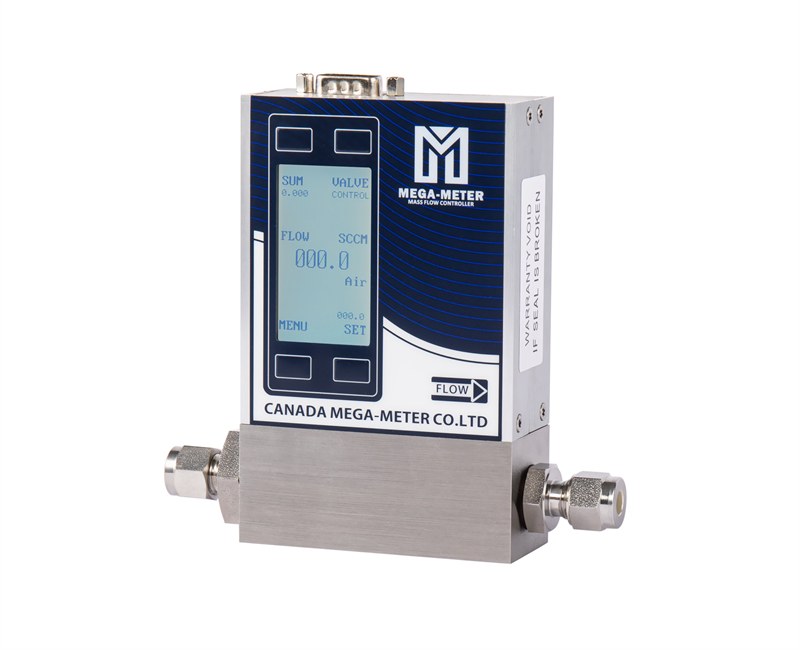
When integrating a mass flow controller (MFC) with a PLC or a host PC, the first question is usually "does it speak Modbus?", and the code is then written from the standpoint of standard Modbus experience. Integrated-display digital mass flow controllers (MFCs) have a characteristic that is easily overlooked: each unit supports two communication schemes at the same time - a proprietary RS485 protocol and standard Modbus RTU - and the device recognises and parses either one on its own.
That means on the same 485 bus, with the same device, you can either send messages in our proprietary format or drive it with any standard Modbus tool. This is very convenient on site, but it also creates a real trap: the two protocols do not resemble each other at all - frame layout, checksum method and address range are all different, and picking the wrong one means "not a single frame comes back".
This article takes both protocols down to the byte level, pairs them with messages that can be copied and pasted as they are, and closes with a troubleshooting list ordered by how often each problem actually shows up on site.
1. How many ways can an MFC talk?
Three settings on the same mass flow controller are independent of each other, and they are the ones most often mixed up at the beginning:
| Setting | Menu entry | Values |
|---|---|---|
| Communication protocol | PRTL | Proprietary RS485 or standard Modbus RTU |
| Communication address | ADDR | Number of the device on the bus, 1 as delivered |
| Communication baud rate | BAUD | 9600 / 19200 / 38400 / 57600, 9600 as delivered |
All three can be set from the host software or from the LCD main menu, where they appear as the ADDR, BAUD, PRTL and GAS entries. The serial parameters are fixed: 9600 baud (changeable), 8 data bits, no parity, 1 stop bit, commonly written as 8N1. When the baud rate is changed, the host and the device must be changed together, otherwise nothing comes back at all. There is one more setting that is just as important yet frequently forgotten - the control mode:
| Control mode | Hex | Meaning |
|---|---|---|
| Analog control | 0x00 | Setpoint comes from the 0-5 V / 4-20 mA input |
| Communication control | 0x01 | Setpoint comes from the host over the bus |
| Local LCD panel control | 0x02 | Setpoint is dialled in on the device panel |
This one decides whether a setpoint command from the host has any effect at all. When the device sits in analog control, a setpoint sent from software is silently ignored - the setpoint channel is occupied by the analog input, so the command cannot get in. In the troubleshooting table, the entry "setpoint produces no control signal" has exactly one first suspect: the setting method does not match the control mode.
2. The proprietary RS485 protocol: fixed 16 bytes, ending in 0x77
This is our own protocol format, and it is very regular in structure - every frame is exactly 16 bytes (32 hex characters), with each field in a fixed position:
| Field | Length | Meaning |
|---|---|---|
| Device address | 2 chars | 0x00-0xFF, decimal 0-255, 1 as delivered |
| Primary command | 2 chars | 0x01-0x07, which group of parameters is addressed |
| Secondary command | 2 chars | Sub-operation within that group |
| Read / write | 2 chars | 0x01 read, 0x02 write |
| Data | 6 chars | A six-character hex number |
| Frame tail | 2 chars | Fixed 0x77 |
The primary commands divide as follows:
| Primary command | Function | Secondary commands |
|---|---|---|
| 0x01 | Baud rate | 0x01 read / 0x02 write |
| 0x02 | Device address | 0x01 read / 0x02 write |
| 0x03 | Gas type | 0x01 read / 0x02 write |
| 0x04 | Control mode | 0x01 read / 0x02 write |
| 0x05 | Valve mode | 0x01 read / 0x02 write |
| 0x06 | Flow | 0x01 read live flow / 0x02 write setpoint |
Read and write differ in only two places: the read/write byte (0x01 read, 0x02 write) and the third byte of the response, which turns into a status byte. Reading the live flow illustrates it: send `01 06 01 01 000000 77` and the device answers `01 06 02 001388 77`. The third byte is 0x02 rather than 0x01 because the position that carried the read/write flag now carries the status. Miss this detail and the response parser will read the frame wrong.
How the flow value is scaled The data field carries the flow as a percentage multiplied by 10000:
| Data field | Decimal | Percentage |
|---|---|---|
| `0x0000` | 0 | 0% |
| `0x2710` | 10000 | 100% |
| `0x1388` | 5000 | 50% |
So with `001388` in hand, divide by 10000 to obtain the percentage and multiply by the nominal full scale of the unit. Note that this is always a percentage, never an engineering unit. Take a full-scale-100 SLPM unit with a live feedback of 50% - the actual flow is 50 SLPM. Converting to SLPM or SCCM is arithmetic you have to do yourself.
One quantity that is easy to miss: setpoint and feedback use the same percentage basis. "Set 50%, read back 50%" only proves that control has locked on; it does not mean the actual flow is exactly half the full scale, because which flow range the unit is fitted for and whether the current gas is the calibration gas both affect the result.
Why cumulative flow takes two reads Cumulative flow is read across two commands in this protocol: secondary command `0x02` returns the high three bytes and secondary command `0x03` the low three bytes. The interval between the two reads must stay below 2 seconds; going over that means the two values may no longer belong to the same cumulative total, and the concatenated number is simply wrong - and wrong in a way that does not look wrong. A complete example: send `01 06 02 01 000000 77` and receive `01 06 02 02 000009 77`, then send `01 06 03 01 000000 77` and receive `01 06 03 02 EF07A0 77`. Concatenating the two replies gives `0x9EF07A0`; convert it to decimal and divide by 10000 to obtain 16666, in the unit of the system. Clearing is simpler still: send the clear command to either secondary command `0x02` or `0x03` - there is no need to send both.
3. Modbus RTU: the standard protocol, straight into mainstream industrial tooling
The real advantage of Modbus RTU is its ecosystem: PLCs, SCADA platforms and third-party Modbus debugging tools can all talk to it, and nobody has to write a protocol parser. The request frame follows the standard Modbus RTU structure:
| Field | Length | Request frame |
|---|---|---|
| Address | 1 byte | Slave address 0x01-0xF7 |
| Function code | 1 byte | 0x03 read / 0x06 write |
| Register address | 2 bytes | High byte first |
| Data | 2 bytes | Register count or setpoint value |
| CRC | 2 bytes | Modbus CRC16, low byte first |
The response frame carries one extra byte for the data length:
| Field | Length | Response frame |
|---|---|---|
| Address | 1 byte | Slave address, same as the request |
| Function code | 1 byte | 0x03 or 0x06, same as the request |
| Byte count | 1 byte | Number of data bytes that follow |
| Data | Byte count | Register value |
| CRC | 2 bytes | Modbus CRC16, low byte first |
Both CRC fields are marked "low byte first" - that is the frame format of this device, meaning the low CRC byte is written first; the byte order is explained in full at the end of this section. Only two function codes are used: 0x03 read holding registers and 0x06 write single register. Register map
| Register | Function | Read / write function code |
|---|---|---|
| 0x0001 | Live flow | 0x03 read / 0x06 write |
| 0x0002 | Cumulative flow | 0x03 read / 0x06 clear |
| 0x0003 | Baud rate | 0x03 read / 0x06 write |
| 0x0004 | Device address | 0x03 read / 0x06 write |
| 0x0005 | Gas type | 0x03 read / 0x06 write |
| 0x0006 | Control mode | 0x03 read / 0x06 write |
| 0x0007 | Valve mode | 0x03 read / 0x06 write |
Messages you can copy and paste Every line below carries a CRC that has been computed and checked, so the frames can be pasted straight into a debugging tool. Note the CRC is low byte first, with the details at the end of this section. A write command (0x06) is echoed back unchanged by the device on success.
| Read operation | Request frame | Returned data |
|---|---|---|
| Read live flow | `01 03 00 01 00 01 D5CA` | `13 88` = 50% |
| Read cumulative flow | `01 03 00 02 00 06 6408` | `9EF07A0` = 16666 |
| Read device address | `01 03 00 04 00 01 C5CB` | `0x0001` = unit 1 |
| Read baud rate | `01 03 00 03 00 01 740A` | `0x00` = 9600 |
| Read gas type | `01 03 00 05 00 01 940B` | `0x4304` = nitrogen |
| Read control mode | `01 03 00 06 00 01 640B` | `0x00` = analog control |
| Read valve mode | `01 03 00 07 00 01 35CB` | `0x02` = closed |
| Write operation | Request frame | What it writes |
|---|---|---|
| Set flow to 100% | `01 06 00 01 27 10 C236` | writes 100% |
| Set flow to 50% | `01 06 00 01 13 88 D55C` | writes 50% |
| Clear cumulative flow | `01 06 00 02 00 00 280A` | echoed |
| Change address to 16 | `01 06 00 04 00 10 C9C7` | echoed |
| Change baud rate to 57600 | `01 06 00 03 00 03 39CB` | echoed |
| Change gas to air | `01 06 00 05 43 00 A8FB` | writes 0x4300 |
| Set control mode to communication | `01 06 00 06 00 01 A80B` | writes 0x01 |
| Set control mode to local LCD | `01 06 00 06 00 02 E80A` | writes 0x02 |
| Force valve control | `01 06 00 07 00 03 780A` | writes 0x03 |
| Force valve closed | `01 06 00 07 00 02 B9CA` | writes 0x02 |
| Force valve purge | `01 06 00 07 00 01 F9CB` | writes 0x01 |
The table lists the request frames and the key returned data. A few typical responses in full: reading live flow returns `01 03 02 13 88 B512`, reading cumulative flow returns `01 03 06 00 00 09 EF 07 A0 1154`, and reading the device address returns `01 03 02 00 01 7984`. A write command (0x06) is echoed back unchanged by the device on success.
Cumulative flow is read differently in the two protocols: under Modbus RTU a single read of three registers returns the complete four-byte value, whereas the proprietary RS485 protocol needs two commands - high three bytes and low three bytes - concatenated, with the interval between them kept below 2 seconds.
CRC byte order: low byte first on this device This is where beginners most often trip. A CRC is a 16-bit number, and to put it into a frame it has to be split into two bytes - and over that pair there are two different conventions in the literature, one called "low byte first" and the other "high byte first". The frame format of this device uses low byte first, that is, the low byte is written first. Take "set flow to 100%" as the example. The frame body is `01 06 00 01 27 10`, and the computed CRC register value is 0x36C2, in which the low byte is `0xC2` and the high byte is `0x36`. Written low byte first, the frame becomes `C2 36`, so the complete message is `01 06 00 01 27 10 C236`. The two conventions compared:
| Byte order | Result | Applies to this device |
|---|---|---|
| Low byte first | `C2 36` | yes |
| High byte first | `36 C2` | no |
The two conventions describe two arrangements of the same 16-bit number, not two different algorithms - the CRC value itself is identical either way, and the only difference is which half is placed first. This device parses low byte first, so a program that writes `36 C2` will never pass the checksum. When that happens, do not suspect the algorithm - swap the two bytes and try again.
The algorithm parameters are a separate set of constants that have to be fixed: initial value 0xFFFF, polynomial 0xA001, shift right, no carry. If any one of them differs, the result differs. The most reliable practice is therefore to use "set flow to 100% = `C236`" as the reference: get your own program to produce `C236` before you connect the device; if it cannot, do not go on the bus at all, because all you will get is timeouts.
One more thing worth separating: the register address itself is high byte first (`0x0001` is written `00 01`), which is a different matter from the CRC byte order - the address byte order must not be flipped together with the CRC. Gas codes The gas type is expressed as a 16-bit code. The complete gas code table is provided with the product documentation; the most commonly used ones are:
| Gas | Gas code | Note |
|---|---|---|
| Air | 0x4300 | Common reference gas |
| Argon | 0x4302 | Steps of 0x0002 |
| Nitrogen | 0x4304 | Factory calibration gas |
| Oxygen | 0x4306 | Common |
| Methane | 0x4308 | Common |
| Hydrogen | 0x4310 | Common |
| Helium | 0x4316 | Common |
| Ammonia | 0x4318 | Common |
Only values listed in the gas code table of the product documentation are accepted; anything outside that range is an invalid setting and has no effect. The unit carries more than 60 common gases and 10 non-standard ones; the full table for a given model is available from the documentation download section.
4. Choosing between the two protocols
| Aspect | Proprietary RS485 | Modbus RTU |
|---|---|---|
| Frame length | Fixed 16 characters | Varies with function code |
| Checksum | 0x77 tail plus fixed length | Standard CRC16 |
| Host software | Parser has to be written to the format | Any generic Modbus tool |
| Ecosystem | Only devices supporting our protocol | Common on PLC and SCADA platforms |
| Valid address range | 0x00-0xFF (0-255) | 0x01-0xF7 (1-247) |
Remember the address range: under the proprietary protocol the address can go up to 255, while under Modbus RTU the valid range is 0x01-0xF7. If a batch of devices is switched from the proprietary protocol to Modbus RTU and an address above 247 was used, the address becomes invalid.
The general recommendation: for a new project with a PLC or SCADA platform, use Modbus RTU; the proprietary protocol is worth keeping only when an existing system has already been written against it, or when third-party equipment recognises nothing else.
5. Wiring several units together
Three arrangements cover most cases. One unit to a PC: the device takes a DB9 female connector, the PC side goes through a 485-to-USB converter, and the supply is the standard 24 V adapter. Two to four units: a four-channel chassis option provides centralised power and centralised communication, each channel connecting to one unit, with a single 485-to-USB cable to the PC. This saves USB ports on the PC side and keeps the installation compact. The address of each unit must be set individually at this point, otherwise two units sharing an address will answer each other. Five units and above: add more four-channel chassis units and interconnect them with the RS485EXT expansion signals; everything else stays the same and the whole system is still controlled from one PC. In the DB9 pin assignment, two pins matter for communication: pin 4, RXD485+ (yellow) and pin 9, TXD485- (grey). These names are given from the viewpoint of the device itself - it receives the positive line and transmits the negative one.
This is the classic RS485 trap: manufacturers differ in how they label A/B and D+/D-, some referring to the receiver and some to the transmitter. A reversed pair shows up as "it works now and then", or as no response at all. The fix is simple - swap the two wires and test; if the link comes up, the two conventions simply use different reference points.
Pin 1 carries the valve control signal (open for valve control, grounded for forced close, tied to the supply voltage for forced purge), pin 2 the analog feedback output and pin 6 the analog setpoint input - and those two pins respond in analog mode only.
6. Eight pitfalls that show up on site
Ordered by how often they actually occur, so work down the list.
1. Wrong control mode, the software setpoint does nothing. In analog control the device ignores a setpoint sent from software, because the setpoint channel is occupied by the analog input. Read 0x0006 to confirm the current mode and write 0x01 when the host is to take over. This one comes first because it is the easiest to mistake for "the communication is broken". 2. Wrong sequence when changing valve state. After the valve has been put in purge, do not switch straight to valve control; go to closed first and then to valve control, which gives the best control performance. Skipping the intermediate step shows up as a sluggish valve or unstable flow control. 3. Too long an interval between the two cumulative flow reads. It must stay below 2 seconds, and completing both within one second is safer. A long interval produces a wrong number, and a wrong number that does not look wrong: the value appears normal while it is actually two data points from different moments glued together. 4. Treating the flow value as an engineering unit. What comes back over the bus is percentage times 10000, not SLPM. To obtain an engineering value, multiply by the full scale. Reading 5000 as "5000 SLPM" is the commonest misunderstanding of this interface. 5. Forgetting to divide the cumulative value by 10000. Same reason: the cumulative value is an integer scaled by 10000, and only after dividing by 10000 does it become the real quantity. 6. Setpoint below the valid lower limit. The valid range of the flow setpoint is 1%-100% of full scale. At the 1% boundary the valve opens so little that it reacts sluggishly, so starting practical setpoints at 2% keeps a controllable margin. 7. Wrong gas code, or a code outside the table. Only values from the gas code table of the product documentation are accepted; anything else is an invalid setting. More insidious is the case where the code is valid but the gas is wrong - running argon while the unit is set to nitrogen shifts the whole flow conversion. 8. CRC never computed, and a single wrong byte voids the frame. The CRC is not optional: every frame must be computed on its own - if the address, function code, register or data changes by one byte, the CRC has to be recomputed. The algorithm itself is not difficult (initial value 0xFFFF, polynomial 0xA001), but two traps dominate. The first is byte order: over the two CRC bytes there are two conventions in the literature, one low byte first and one high byte first, and this device uses low byte first - write it the other way round and the checksum never passes. The second is mixing hex and decimal, for instance feeding the register address in as a decimal number.
A few verified frames are worth keeping as a reference for checking an implementation:
| Purpose | Function code | Frame |
|---|---|---|
| Set flow to 100% | 0x06 | `01 06 00 01 27 10 C236` |
| Set flow to 50% | 0x06 | `01 06 00 01 13 88 D55C` |
| Clear cumulative flow | 0x06 | `01 06 00 02 00 00 280A` |
| Read device address | 0x03 | `01 03 00 04 00 01 C5CB` |
| Read live flow | 0x03 | `01 03 00 01 00 01 D5CA` |
If the CRC your own code produces does not match these lines, check the byte order first, then check whether the 16-bit value has been split into high and low bytes the wrong way round.
7. A checklist before you start
Walking through this order avoids the great majority of problems on site:
1. Confirm which protocol is in use - the PRTL setting of the device and the format sent by the host must match, because a device parses in one way only; 2. Confirm the control mode - read 0x0006 and write 0x01 when the host is to control the flow; 3. Confirm the parameters match - baud rate (8N1), address and protocol must all agree with the host; 4. Start with the simplest possible read - read the device address (0x0004) and check that the reply matches the configured address. Once this works, the physical layer, the protocol, the address and the CRC are all confirmed at once; 5. Then add function after function - read flow, read cumulative, write setpoint, read cumulative again, checking that every step returns the expected value; 6. Read cumulative flow either as two reads less than 2 seconds apart, or as one Modbus read of three registers; 7. Do the engineering conversion yourself - percentage divided by 10000, multiplied by the full scale, and only then the unit is right.
Two operating conditions come with the device: on every power-up, let it warm up for at least ten minutes so that it reaches its best operating state, and after wiring, confirm that nothing is miswired or left unconnected - a miswire will damage the unit. For multi-drop installations, handle terminal resistors and bus topology according to standard RS485 practice.
The value of digital control is clear: one bus carries many units, cabinet wiring shrinks considerably, and the host can read back setpoint, gas type and valve state - information the analog channel cannot return. But all of that depends on getting the protocol layer right, and each of the eight points above maps to a specific symptom that looks like a communication fault while the real cause is something else.
Start with reading the device address, get the simplest command working, and everything after that is repetition - the same routine applies to any mass flow controller (MFC) on the bus.
For selection, product documentation or technical enquiries, contact Shenzhen Flowmethod Measure & Control Systems Co., Ltd.:
Contact: Mr. Dou | Tel: +86-18038183381
Email: doufeijin@hotmail.com | Website: www.flowmethod.net